Kirikiri Configuration
About Kirikiri Configuration
"Kirikiri Configuration" is a tool for setting Kirikiri options through a GUI.
It exists so that end users (secondary users) can do a certain amount of troubleshooting and performance tuning on their own.
To open the engine configuration, start the Kirikiri executable with -userconf. The game does not start; instead, the configuration screen opens in a browser (an Edge / Chrome window without an address bar, or the default browser if neither is available). The screen is the same on the native Windows (WINVER) build and the SDL build.
- Select an item from the list on the left and choose its value on the right. The item's description and default value are also shown on the right
- "Save and close" saves the settings to the configuration file (.cfu) and exits. "Close without saving", or closing the window, exits without saving
- Only the items you changed on the screen and the items already in the .cfu are saved. Unchanged items are not written, so the settings in the .cf shipped with the game stay in effect
- The configuration screen is served by a server that the game executable itself runs locally (127.0.0.1). It cannot be reached from outside, and no Internet connection is required
The option names, the values that can be set, and the option descriptions come from information built into the Kirikiri engine. The descriptions follow the OS language setting (ja / en / chs / cht), and you can also specify the language explicitly with the command-line option -language.
About Configuration Files
Kirikiri has two kinds of configuration files: one placed in the same location as the Kirikiri executable, named after the executable with the extension changed to cf, and one placed in the data storage location specified by -datapath in Command-Line Options, named after the executable with the extension changed to cfu.
The cfu file is generated by the end-user-facing "engine configuration (-userconf)".
If you configure settings with Releaser, a .cf file is created; note that the options you set will not take effect unless this file is distributed together with the Kirikiri engine.
If these files do not exist, they are created when you start the engine configuration and press "Save and close".
Note: A configuration file consists of lines of the form
name="value", one per line. The "value" part is a sequence of \xNN escapes, each representing a Unicode code point. For example, opt="\x61\x62\x63\x3042\x3044\x3046" represents "abcあいう". Be careful when writing to these files from other applications.If you write a value without the \xNN form, such as opt="abcあいう", the Kirikiri engine reads it correctly, but the engine configuration cannot recognize this form and may not behave as expected. The double quotes around the value are also required.
The Engine Configuration Screen
The engine configuration screen looks like this.
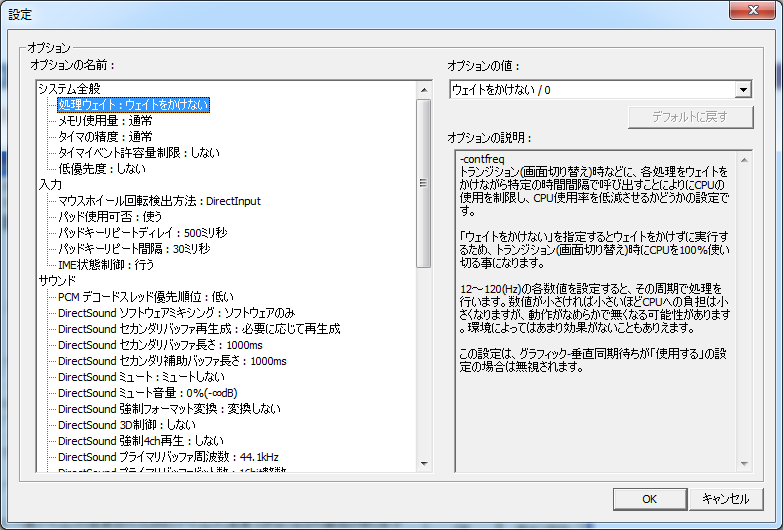
- "Option name"
Lists the options that can be set.
See also Command-Line Options.
- "Option value"
Lists the values that can be set for the option selected in "Option name".
Select one.
- "Option description"
Shows the description of the option selected in "Option name".